
VOD Dubbing Automation Example
This guide shows how to build an automated system for dubbing multiple videos using the MK.IO API and webhooks. After setup, the pipeline runs completely automatically: submit dubbing jobs once, webhooks handle track insertion when complete.
What you'll build:
- A job submission script that creates temporary assets and submits dubbing jobs
- A webhook listener that automatically inserts dubbed tracks when jobs complete
Before starting you will need encoded source videos in separate assets
You need three English-language videos that are already encoded for streaming, each in its own asset with a .ism manifest present (e.g., video-001-encoded, video-002-encoded, video-003-encoded).
If you don’t have these yet, follow the previous guide to upload, create assets, and run an encoding job before using this demo.
Prerequisites
Step 1: Install Python Packages
pip install requests flask python-dotenvStep 2: Install ngrok
Why ngrok? (local webhooks):
Webhooks must call a publicly reachable HTTPS URL - localhost is not accessible from MK.IO’s servers.
ngrok creates a temporary public URL that tunnels to your local Flask server so MK.IO can POST job events to your machine during development.
In production, you can replace ngrok with a real HTTPS endpoint (cloud/app host) and keep the same webhook flow.
Installing ngrok: macOS (Homebrew):
brew install ngrok/ngrok/ngrokWindows (Chocolatey):
choco install ngrokLinux:
- Download from ngrok.com/download,
- unzip, and add the binary to your PATH
Step 3: Create Environment File
Create a file named .env in your project directory:
Add these lines (replace with your actual values):
MKIO_API_TOKEN=your_jwt_here
MKIO_PROJECT_NAME=your_project_name
STORAGE_ACCOUNT_NAME=your_storage_account_name
WEBHOOK_SECRET=any_random_secret_string_here
How to get each value:
| Variable | How to Get |
|---|---|
MKIO_API_TOKEN | MK.IO Dashboard → Organisation Settings → API Tokens → Create Token |
MKIO_PROJECT_NAME | Your MK.IO project name (visible in dashboard URL or settings) |
STORAGE_ACCOUNT_NAME | Azure Storage account name where your assets/ videos are stored |
WEBHOOK_SECRET | Any random string you choose (e.g., my-demo-secret-12345) |
Step 4: Create Transforms
You need to create 4 transforms in your MK.IO project. These are reusable templates that define how to process videos.
Important: Refer to the VOD Dubbing Demo Guide section "Create Transforms" for the exact API requests. You need to create:
dubbing-multi-lang- The main dubbing transform (English → Spanish, German, French)insert-spanish- Add Spanish audio trackinsert-german- Add German audio trackinsert-french- Add French audio track
All 4 should return 200 OK.
Creating the Scripts
File 1: submit_jobs.py
This script creates temporary assets for dubbed audio and submits dubbing jobs.
Create a file named submit_jobs.py:
# submit_jobs.py
# This script simply creates temporary output assets to hold the dubbed audio results and submits dubbing jobs for each encoded video file.

import os
import requests
from dotenv import load_dotenv

load_dotenv()

# ===== Get environment variables =====
API_TOKEN = os.getenv('MKIO_API_TOKEN')
PROJECT_NAME = os.getenv('MKIO_PROJECT_NAME')
STORAGE_ACCOUNT = os.getenv('STORAGE_ACCOUNT_NAME')

# ===== Define api endpoint and headers =====
BASE_URL = f"https://api.mk.io/api/v1/projects/{PROJECT_NAME}/media"
HEADERS = {
    'Authorization': f'Bearer {API_TOKEN}',
    'Content-Type': 'application/json'
}

# ===== Define encoded video names - CHANGE THESE to your actual encoded video asset names =====
VIDEOS = [
    'video-001-encoded',
    'video-002-encoded',
    'video-003-encoded'
]

# ===== This is the first step: To create an asset for each video to contain the generated dubbed audio .mp4 files. =====
def create_dubbed_audio_asset(source_asset):
    asset_name = f"{source_asset}-dubbed-audio"
    url = f"{BASE_URL}/assets/{asset_name}"

    body = {
        "properties": {
            "description": f"Dubbed audio for {source_asset}",
            "storageAccountName": STORAGE_ACCOUNT
        }
    }
    response = requests.put(url, headers=HEADERS, json=body)

    # If we get error 409, the asset already exists - this is fine we can still proceed.
    if response.status_code == 409:
        print(f"Asset already exists: {asset_name}")
    else:
        response.raise_for_status()
        print(f"Created asset: {asset_name}")

    return asset_name

# ===== Get the first mp4 files from the encoded asset to run the dubbing job on. They all contain the neccesary audio files - lowest bitrate is fine. =====
def get_first_mp4(asset_name):
    """
    How this works:
    1. make a GET request to /assets/{asset}/storage to list files
    2. Parse the response.spec.files
    3. Find the first file that ends with .mp4 (can be adjusted to find the lowest bitrate)
    """
    url = f"{BASE_URL}/assets/{asset_name}/storage"

    response = requests.get(url, headers=HEADERS)

    # If the asset has no storage container it will return error 400
    if response.status_code == 400:
        return None
    response.raise_for_status()

    storage = response.json()
    files = storage.get('spec', {}).get('files', [])

    # Find the first .mp4 file
    for f in files:
        name = f.get('name') or f.get('path')
        if name and name.endswith('.mp4'):
            return name
    return None

# ===== Submit a dubbing job to the dubbing transform created during setup. In this example it is called 'dubbing-multi-lang'. =====
def submit_dubbing_job(source_asset, dubbed_asset, input_file):
    """
    This function:
    - takes the {input_file} from the {source_asset}
    - Applies the dubbing-multi-lang transform
    - Writes the results to the output {dubbed_asset}
    - the service then sends a webhook to our listener when done
    """
    job_name = f"dub-{source_asset}"
    url = f"{BASE_URL}/transforms/dubbing-multi-lang/jobs/{job_name}"

    body = {
        "properties": {
            "description": f"Dub {source_asset}",
            "priority": "Normal",
            "input": {
                "@odata.type": "#Microsoft.Media.JobInputAsset",
                "assetName": source_asset,
                "files": [input_file]
            },
            "outputs": [{
                "@odata.type": "#Microsoft.Media.JobOutputAsset",
                "assetName": dubbed_asset
            }]
        }
    }
    response = requests.put(url, headers=HEADERS, json=body)
    response.raise_for_status()

    print(f"Submitted dubbing job: {job_name}")
    return job_name

# ===== The main entry point =====
def main():
    print("=================================")
    print(" MK.IO VOD Dubbing - submit jobs")
    print("=================================")

    print("Videos to process:")
    for video in VIDEOS:
        print(f" - {video}")

    print(f"\nCreating temporary assets for dubbed audio...\n")

    jobs_submitted = []

    for video in VIDEOS:
        # Create the output asset for dubbed audio
        dubbed_asset = create_dubbed_audio_asset(video)

        # Get the input file from the source asset
        input_file = get_first_mp4(video)
        if not input_file:
            print(f"  ERROR: No mp4 file found in asset: {video}.")
            continue
        print(f"  Input file for {video}: {input_file}")

        # Submit the dubbing job
        job_name = submit_dubbing_job(video, dubbed_asset, input_file)
        jobs_submitted.append(job_name)
        print()

    print("="*10 + "\n")
    print(f"\n✓ Submitted {len(jobs_submitted)} dubbing jobs\n")

    print("\nDubbing will process in the background.")
    print("="*10 + "\n")

if __name__ == "__main__":
main()Edit lines 23-26 and change
VIDEOSto your actual video asset names
What it does:
- For each video: creates a temp asset + submits a dubbing job
- Takes ~1-2 seconds per video
- Then exits and tells you what to do next
File 2: webhook_listener.py
This script receives webhooks from MK.IO and automatically handles track insertion.
Create a file named webhook_listener.py:
# Webhook_listener.py
"""
This is a simple Flask server that:
1. Recieves webhooks when the dubbing jobs are complete
2. Extracts the dubbed audio files from the output asset
3. Automatically submits the track insertion jobs using the insertion transforms created earlier.
4. Recieves webhooks when the track insertion jobs are complete.

Note the track insertion transforms must already exist in your MK.IO project for this to work.
    # insert-spanish
    # insert-french
    # insert-german
"""
import os
import requests
from flask import Flask, request, jsonify
from dotenv import load_dotenv
load_dotenv()

# ===== Get environment variables =====
API_TOKEN = os.getenv('MKIO_API_TOKEN')
PROJECT_NAME = os.getenv('MKIO_PROJECT_NAME')
WEBHOOK_SECRET = os.getenv('WEBHOOK_SECRET')

# ===== Define api endpoint and headers =====
BASE_URL = f"https://api.mk.io/api/v1/projects/{PROJECT_NAME}/media"
HEADERS = {
    'Authorization': f'Bearer {API_TOKEN}',
    'Content-Type': 'application/json'
}

app = Flask(__name__)


"""
Function to get a list of the dubbed audio files from the output asset

After dubbing completes, the output asset contains three files:
    - video_es-ES.mp4 (Spanish dub)
    - video_de-DE.mp4 (German dub)
    - video_fr-FR.mp4 (French dub)

This function lists those files and returns them organised by language.
"""
def get_dubbed_files(asset_name):
    url = f"{BASE_URL}/assets/{asset_name}/storage"
    response = requests.get(url, headers=HEADERS)
    if response.status_code == 400:
        # The asset has no files yet
        return {}

    response.raise_for_status()
    storage = response.json()
    files = storage.get('spec', {}).get('files', [])
    dubbed = {}

    # Parse the filenames to identify the language codes
    for f in files:
        path = f.get('path') or f.get('name')
        if path:
            if '_es-ES.mp4' in path:
                dubbed['es-ES'] = path
            elif '_de-DE.mp4' in path:
                dubbed['de-DE'] = path
            elif '_fr-FR.mp4' in path:
                dubbed['fr-FR'] = path

    return dubbed

"""
Helper function to submit the track insertion job for a single track

This function takes a single dubbed audio file and submits a track insertion job (using the appropriate insert transform created earlier).
This adds the dubbed audio as a new audio track to the original encoded video asset.
After all the track insertion jobs are submitted, the asset will have multiple audio tracks available for playback, and viewers can select their language.
"""
def submit_track_insertion_job(dubbed_asset, target_asset, dubbed_file, language_code, transform_name):
    lang_short = language_code.split('-')[0]  # e.g., 'es' from 'es-ES'
    job_name = f"insert-{target_asset}-{lang_short}"
    url = f"{BASE_URL}/transforms/{transform_name}/jobs/{job_name}"

    body ={
        "properties": {
            "description": f"Insert {language_code} track",
            "priority": "Normal",
            "input": {
                "@odata.type": "#Microsoft.Media.JobInputAsset",
                "assetName": dubbed_asset,
                "files": [dubbed_file]
            },
            "outputs": [{
                "@odata.type": "#Microsoft.Media.JobOutputAsset",
                "assetName": target_asset
            }]
        }
    }

    response = requests.put(url, headers=HEADERS, json=body)
    response.raise_for_status()

    print(f"{job_name} submitted for {language_code}")

"""
Function to insert all three language tracks for a video.

This is called automatically when a dubbing job completes (via webhooks)
Steps:
    1. Get a list of dubbed files from the output asset
    2. For each language - submit a track insertion job
"""
def insert_all_tracks(source_asset, dubbed_asset):
    print (f"\n Inserting dubbed tracks for asset: {source_asset}")

    dubbed_files = get_dubbed_files(dubbed_asset)

    if not dubbed_files:
        print("No dubbed files found.")
        return

    # Map language codes to transform names
    languages = {
        'es-ES': 'insert-spanish',
        'fr-FR': 'insert-french',
        'de-DE': 'insert-german'
    }

    # Submit a track insertion job for each language
    for lang_code,transform in languages.items():
        if lang_code in dubbed_files:
            dubbed_file = dubbed_files[lang_code]
            submit_track_insertion_job(dubbed_asset, source_asset, dubbed_file, lang_code, transform)


"""
Flask route to handle incoming webhooks.
"""
@app.route('/webhook', methods=['POST'])
def webhook():
    # Verify the webhook is authentic by checking with the auth header
    auth = request.headers.get('Authorization', '')
    expected_auth = f"Bearer {WEBHOOK_SECRET}"

    if auth != expected_auth:
        print("!! Webhook received with invalid authorization !!")
        return jsonify({"error": "Unauthorized"}), 401

    event = request.get_json()
    if not event:
        return jsonify({"error": "There is no body"}), 400

    # Etract the information from the webhook payload
    event_type = event.get('type')
    data = event.get('data',{})
    resource = data.get('resource',{})
    job_name = resource.get('name')
    job_state= data.get('state')

    # Log the webhjook
    print(f"\n Webhook received: {event_type}")
    print(f"   Job: {job_name}")
    print(f"   State: {job_state}")

    # Handle dubbing job completion
    # Job names follow the pattern "dub-{source_asset}"
    if job_state == 'Finished' and job_name.startswith('dub-'):
        source_asset = job_name.replace('dub-', '')
        dubbed_asset = f"{source_asset}-dubbed-audio"
        #automatically trigger the track insertion
        insert_all_tracks(source_asset, dubbed_asset)

    # Handle track insertion job completion
    # Job names follow the pattern "insert-{source_asset}-{lang_short}"

    elif job_state == 'finished' and job_name.startswith('insert-'):
        parts = job_name.split('-')
        lang = parts [-1]
        print (f" Track insertion for language {lang} completed.")

    # Handle errors
    elif job_state =='error':
        print(f" !! Job {job_name} failed !! ")

    # Always return 200 so MKIO doesn't retry the webhook over and over
    return jsonify({"status": "received"}), 200

@app.route('/health', methods=['GET'])
def health():
    # Health check endpoint to verify if the server is running
    return jsonify({"status": "ok"}), 200

if __name__ == '__main__':
    print("\n" + "="*60)
    print("MK.IO VOD Dubbing - Webhook Listener")
    print("="*60)
    print("\nListening on http://localhost:5000")
    print("Webhook endpoint: http://localhost:5000/webhook\n")
    print("Make sure you:")
    print("  1. Created all transforms (using the guide)")
    print("  2. Created webhook rule in MK.IO dashboard")
    print("  3. Ran submit_jobs.py to submit dubbing jobs")
    print("\nWaiting for webhooks...\n")
    print("="*60 + "\n")

    app.run(host='0.0.0.0', port=5000, debug=False)
Running the Complete Pipeline
Step 1: Set Up ngrok Tunnel
Open a new terminal and run:
ngrok http 5000You'll see:
Forwarding https://abc123def456.ngrok.io -> http://localhost:5000Copy the HTTPS URL (the https://abc123def456.ngrok.io part).

Important! When creating the webhook rule below - make sure to add
/webhookto the end of your ngrok URL
Step 2: Create Webhook Rule
Using Postman, make a PUT request:
PUT https://api.mk.io/api/v1/projects/YOUR_PROJECT_NAME/webhookrules/dubbing-demo

Headers:
  Authorization: Bearer YOUR_MKIO_JWT
  Content-Type: application/json

Body:
{
  "spec": {
    "enabled": true,
    "url": "https://soundless-ninfa-runcinate.ngrok-free.dev/webhook",
    "authentication": {
      "headers": {
        "Authorization": "Bearer demo-secret-key-12345"
      }
    },
    "events": [
      "MediaKind.JobStarted",
      "MediaKind.JobFinished"
    ]
  }
}
Replace:
YOUR_PROJECT_NAMEwith your project nameYOUR_API_TOKENwith your API tokenhttps://abc123def456.ngrok.iowith your ngrok URL from Step 3 +/webhookyour_secret_key_12345with yourWEBHOOK_SECRETfrom.env
You should get 200 OK.
Step 3: Start the Webhook Listener
Open a terminal and run:
python webhook_listener.pyOutput:
❯ python webhook_listener.py

============================================================
MK.IO VOD Dubbing - Webhook Listener
============================================================

Listening on http://localhost:5000
Webhook endpoint: http://localhost:5000/webhook

Make sure you:
  1. Created all transforms (using the guide)
  2. Created webhook rule in MK.IO dashboard
  3. Ran submit_jobs.py to submit dubbing jobs

Waiting for webhooks...
This server is now listening for webhooks on your local machine at localhost:5000.
Step 4: Submit Dubbing Jobs
Open a new terminal and run:
python submit_jobs.pyOutput:
❯ python submit_jobs.py
=================================
 MK.IO VOD Dubbing - submit jobs
=================================
Videos to process:
 - video-001-encoded
 - video-002-encoded
 - video-003-encoded

Creating temporary assets for dubbed audio...

Created asset: video-001-encoded-dubbed-audio
  Input file for video-001-encoded: demo-video-1_1280x720_3400k.mp4
Submitted dubbing job: dub-video-001-encoded

Created asset: video-002-encoded-dubbed-audio
  Input file for video-002-encoded: demo-video-2_1280x720_3400k.mp4
Submitted dubbing job: dub-video-002-encoded

Created asset: video-003-encoded-dubbed-audio
  Input file for video-003-encoded: demo-video-3_1280x720_3400k.mp4
Submitted dubbing job: dub-video-003-encoded

==========


✓ Submitted 3 dubbing jobs

Dubbing will process in the background.
==========
What You'll See
The webhook listener terminal will start showing live updates:
 ============================================================

 Webhook received: MediaKind.JobStarted
   Job: dub-video-001-encoded
   State: Scheduled
127.0.0.1 - - [13/Nov/2025 11:09:45] "POST /webhook HTTP/1.1" 200 -

 Webhook received: MediaKind.JobStarted
   Job: dub-video-002-encoded
   State: Scheduled
127.0.0.1 - - [13/Nov/2025 11:09:46] "POST /webhook HTTP/1.1" 200 -

 Webhook received: MediaKind.JobFinished
   Job: dub-video-001-encoded
   State: Finished

 Inserting dubbed tracks for asset: video-001-encoded
insert-video-001-encoded-es submitted for es-ES
insert-video-001-encoded-fr submitted for fr-FR
insert-video-001-encoded-de submitted for de-DE
127.0.0.1 - - [13/Nov/2025 11:13:19] "POST /webhook HTTP/1.1" 200 -

 Webhook received: MediaKind.JobStarted
   Job: dub-video-003-encoded
   State: Scheduled
127.0.0.1 - - [13/Nov/2025 11:13:22] "POST /webhook HTTP/1.1" 200 -

 Webhook received: MediaKind.JobFinished
   Job: dub-video-002-encoded
   State: Finished

 Inserting dubbed tracks for asset: video-002-encoded
insert-video-002-encoded-es submitted for es-ES
insert-video-002-encoded-fr submitted for fr-FR
insert-video-002-encoded-de submitted for de-DE
127.0.0.1 - - [13/Nov/2025 11:15:20] "POST /webhook HTTP/1.1" 200 -

 Webhook received: MediaKind.JobStarted
   Job: insert-video-001-encoded-es
   State: Scheduled
127.0.0.1 - - [13/Nov/2025 11:15:23] "POST /webhook HTTP/1.1" 200 -

 Webhook received: MediaKind.JobFinished
   Job: insert-video-001-encoded-es
   State: Finished
127.0.0.1 - - [13/Nov/2025 11:15:33] "POST /webhook HTTP/1.1" 200 -

 Webhook received: MediaKind.JobStarted
   Job: insert-video-001-encoded-fr
   State: Scheduled
127.0.0.1 - - [13/Nov/2025 11:15:40] "POST /webhook HTTP/1.1" 200 -

### And so on...
You should also see on the MK.IO dashboard the jobs appear and complete, as well as assets being created and populated:

Assets
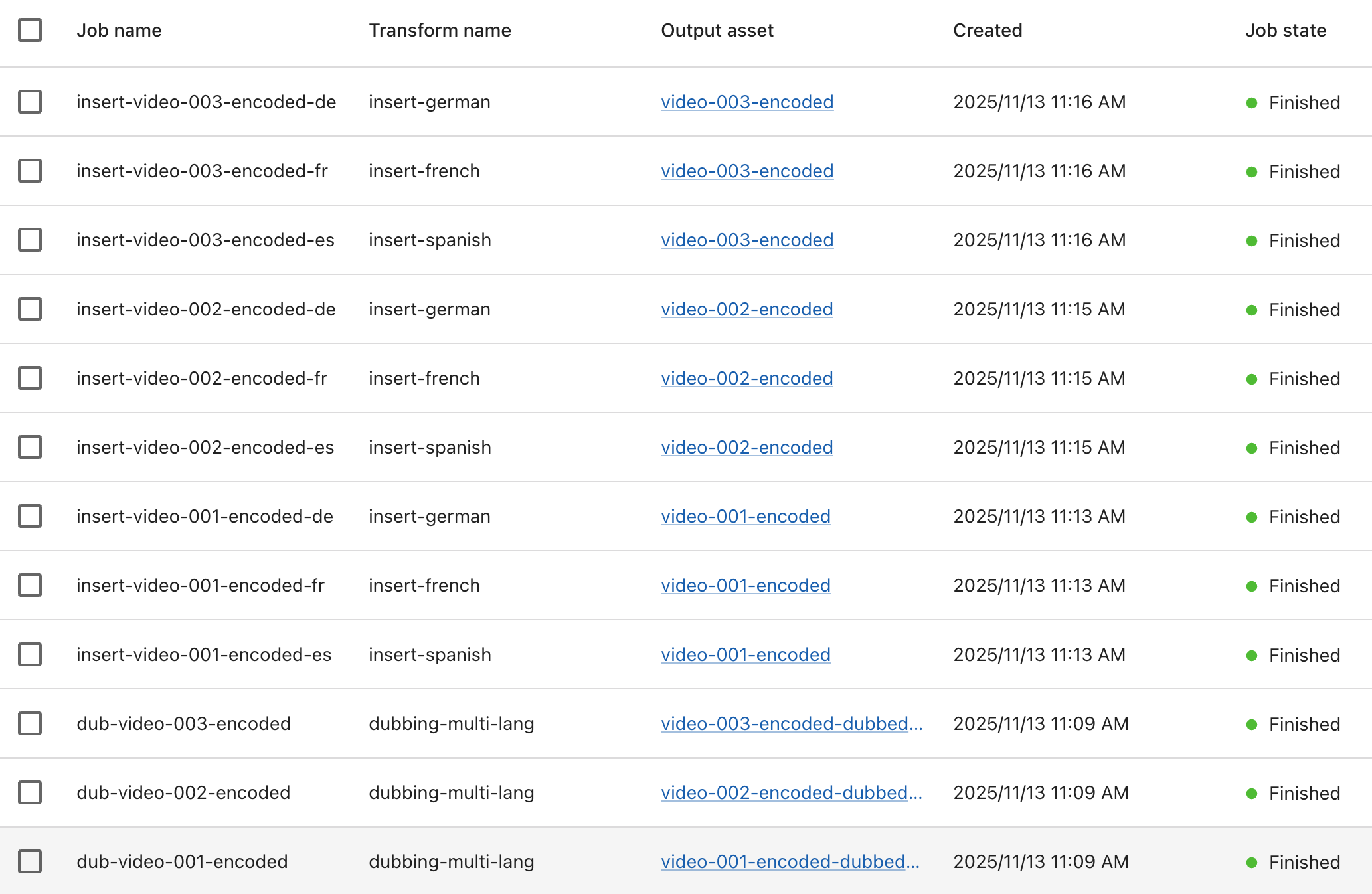
Video Processing -> Jobs
Once all jobs are complete you should see the following new tracks in your encoded assets:

From here you can set up your streaming endpoints and locators to playback and test the new dubbed audio!
Understanding the Code
Key Concepts
Job Naming Convention:
- Dubbing jobs:
dub-{source_asset}→ Makes it easy to parse in webhooks - Track insertion:
insert-{source_asset}-{lang}→ Identifies which video and language
Webhook Flow:
- MK.IO processes a job
- When complete, MK.IO POSTs to your webhook URL
- Your webhook handler parses the job name
- If it's a dubbing job → automatically submit track insertion
- If it's track insertion → just log completion
Authentication:
- Webhook verification via Bearer token in Authorization header
- This ensures webhooks come from MK.IO, not malicious third parties
Next Steps
Once you see this working, you can:
-
Add asset purging for dubbed-audio assets
-
Add automatic subtitle generation/ insertion stages
-
Scale to more videos
- Remove hardcoded
VIDEOSlist - Query all assets via API
- Loop through them
- Remove hardcoded
-
Optimise:
- Submit multiple dubbing jobs in parallel
- Adjust delays and settings based on your needs
Key Files
submit_jobs.py- Submits the dubbing jobs (one-time run)webhook_listener.py- Listens for webhooks and auto-inserts tracks (long-running).env- Your credentials (never commit to git)
Both scripts read from .env for configuration, so you only need to update credentials in one place.
Updated 7 days ago